
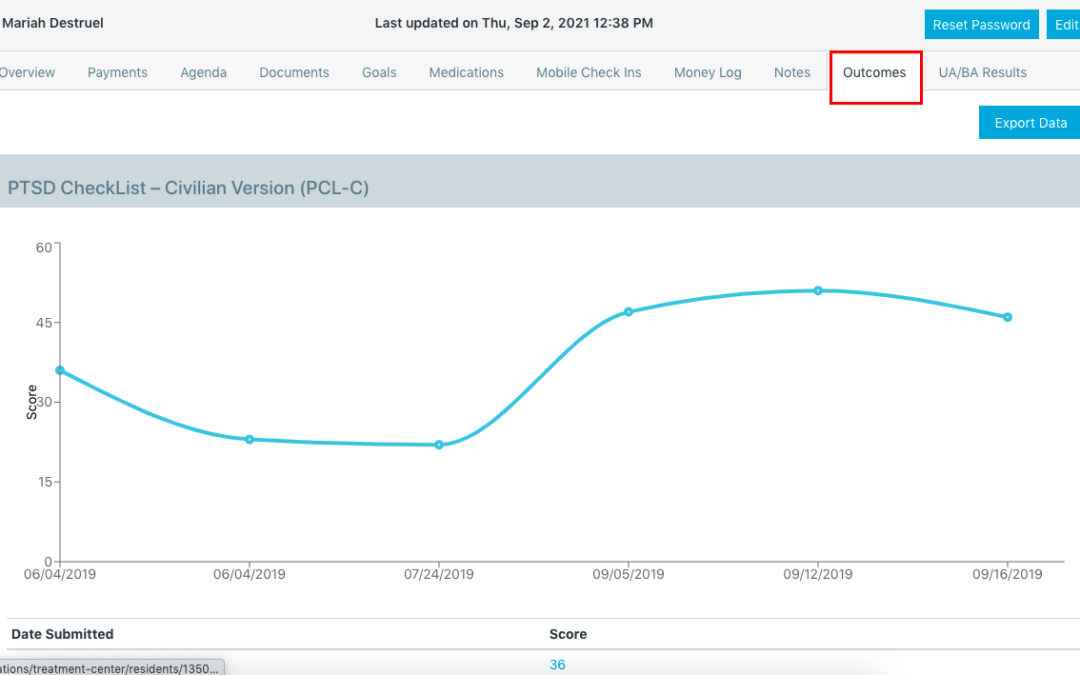
If you are an organization providing treatment services to your clients, you will need to collect Outcomes data on your clients to evaluate your treatment plan success. In order to collect Outcomes data you will need your clients to submit surveys to capture that data.
We make this process VERY EASY for you and your clients. You’ll gather the data you need to validate treatment plans, improve reimbursements from insurance, and request extended authorizations for treatment as necessary. Your clients will benefit from the ease of use of the Survey feature in their Client App, and will benefit from the data captured which in turn improves their treatment strategy overall.
STEP 1: Identify the Surveys you will want to utilize to collect outcomes data
Your clinical staff should be able to identify 1 to 4 surveys they would want to utilize to collect Outcomes data. They may already be using some surveys, so asking them for those surveys and sharing them with your account management is Step 1 to make sure they are then available in your accounts Survey feature:
Need help identifying some clinical surveys to utilize? No worries, we have some industry standard options you can utilize, here is the list of our standard options. We recommend you identify 1 to 4 Surveys and review their academic studies to verify they capture the data your team is interested in analyzing in order to support treatment, insurance reimbursements, and validate authorization request:
- Generalized Anxiety Disorder 7-item (GAD-7) scale
- 2018 Personal Wellness Assessment with 8 Dimensions of Wellness
- DASS-21
- Adverse Childhood Experience (ACE)
- Recovery Capital Scale
- Insomnia Severity Index
- PTSD CheckList – Civilian Version (PCL-C)
- Patient Health Questionnaire (PHQ-9)
- World Health Organization Disability Assessment Schedule 2.0
- Christo Inventory Substance-misuse form
- Adult Self-Report Scale (ADHD)
- YALE-BROWN OBSESSIVE COMPULSIVE SCALE (Y-BOCS)
- Why Not Prosper: Beck’s Depression Inventory
STEP 2: Add your Surveys to your client’s Agenda & Shared Resources
Once you’ve identified the Surveys you’d like to use and have asked your account management to add them to your account, your next step is to get them to your client’s Client Recovery App to start asking for submissions.
*If you have clients without phones because they are in your residential program for example, no worries, you can simply open the Survey directly from your admin account’s ‘Survey section’ and proceed with submissions in that manner.*
STEP 3: Analyze the data in your Outcomes Dashboard
As your Survey submissions begin, you will start gathering Outcomes data on your individual client’s progress and aggregate data on how your program is responding to certain Surveys overall.
To analyze the data you have two options with your One Step account: individual data can be analyzed in the client’s profile and program wide/aggregate data can be analyzed in the Outcome Dashboard.
Pro tip – you can even compare one clinician versus another clinician’s client’s progress per Survey results in the Outcomes Dashboard.
If you need any assistance with setting up your Surveys or best practices for analyzing your Outcomes data please do not hesitate to reach out to us with questions or to request a demo call, we are always here to help!